Three weeks after Gemini 3.6 Flash, Google has announced its newest workhorse model, Gemini 3.7 Flash.
3.7 Flash has shown significant improvements on coding-related tasks such as debugging and issue resolution over 3.6 Flash, according to Google. The new Gemini 3.7 Flash is a better developer experience than 3.6 Flash — it is more adaptable to roadblocks, more faithful to instructions, and more diligent in its thinking.
The latest release of the Gemini app includes a new feature that will allow you to remove the visible watermarks that appear in the bottom corner of images generated using the Nano Banana image model, videos created with Omni, and song lyrics produced with Lyria.
How to Remove Media Watermarks on Gemini App
You can now hide the corner watermarks on AI-generated media. These changes will affect Nano Banana for images, Omni for videos, and Lyria for music generation. If you want to get rid of the watermark on Gemini, here’s how.
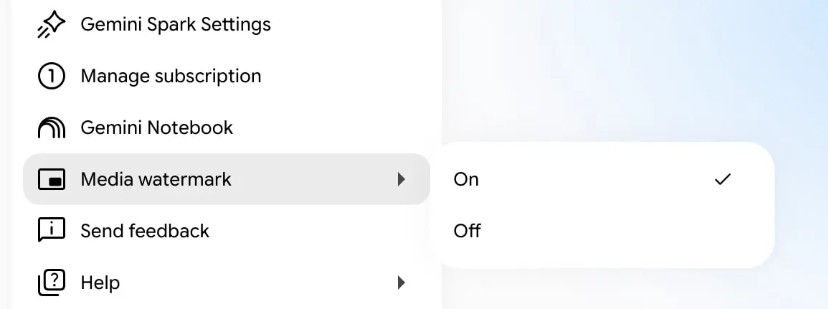
- Open the Gemini web version.
- Next, click the Settings gear icon in the lower-left.
- Head over to the new ‘Media Watermark’ section.
- Choose On or Off according to your needs.
Recommended: How to Use Gemini AI to Create Music
Your selection is used for all future image, video, and song generations.
Turning off the toggle that removes the visible watermarks from the corner of your media doesn’t mean the files you generated are untraceable.
Every piece of media you create with Gemini will still have an invisible watermark (SynthID) and C2PA provenance metadata embedded directly into the file.
So it just means that the watermark is hidden, but it’s still there. Another important thing is that Google said the option to disable the visible watermark will not be available in countries where local laws require visible AI labeling.
Update is Rolling Out Across Platforms
The 3.7 flash and new watermark toggle are live now but will take a few more days or weeks to reach every user.
So if you’re not seeing the 3.7 Flash and the new watermark toggle, check whether your local laws require visible AI labeling. If all goes well, you can expect to see the new feature in a few days or weeks.
This guide is about Gemini 3.7 Flash and the new watermark toggle. What do you think of these two new features? Let us know in the comments. If you liked this guide, please share it with others.