

Earlier this year, ChatGPT launched Health, an experience that combines all your health information with the intelligence of ChatGPT. Health by ChatGPT can help you be better informed and prepared as you navigate your health.
OpenAI has recently rolled out ChatGPT Health to all eligible U.S. users 18+ on the web and iOS. This update lets users securely link Apple Health and supported medical records to help ChatGPT better understand your health information and monitor how it changes over time.
ChatGPT Health
According to OpenAI, many people have difficulty comprehending their health information and navigating the healthcare system on their own. OpenAI says more than 300 million people also use ChatGPT to ask health-related questions – they need help comprehending their Lab reports and checking whether their doctor’s plain help builds a healthier routine.
So, the idea behind ChatGPT Health is to tackle these issues. It allows users to use related data they have connected in the Health app, compare new results against previous reports, summarize changes, and learn more about sleep patterns, activity, and workouts associated with the routine.
What will ChatGPT Health Do?
ChatGPT Health can do the following:
- It can sync with your Apple Health data and supported medical documents.
- Explain the lab reports, medical records, and doctor’s notes in simple text.
- Compare old health records to new health records.
- It can also detect important changes and provide personalized health insights.
- Also helps you get ready for doctor visits.
Recommended: How to Get Nano Banana Pro For Free
How to Access Health ChatGPT for Free
ChatGPT’s Health is now free to users in the U.S. It is available on Free, Go, Plus, and Pro plans. If you’re 18 or older and live in the U.S., you can try out this feature today. Here are the easy steps to use ChatGPT Health:
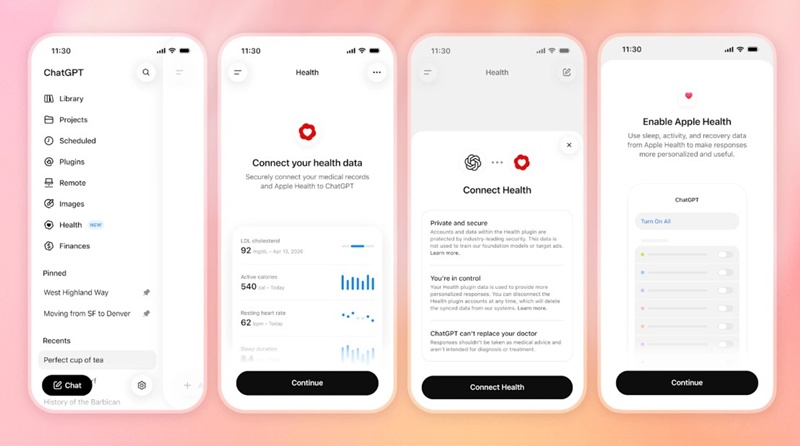
- Select Health from the ChatGPT Sidebar.
- Select Get Started and follow the on-screen instructions.
- Afterward, you can link your Apple Health data or supported medical records.
- When your data is synced, you’ll be ready to start asking your health questions.
You can always visit the Health to view recent data and trends, discover insights, review previous records, and revisit previous conversations.
This guide covers what ChatGPT Health is and how to use it. If you want more help on this topic, let us know in the comments.